DataKeen
Don’t just manage data. Lead with it.

Transform the way your organization thinks — from raw numbers to decisive action.

DataKeen is a dashboard designed for the K12 District and Campus Administrator who need quick & easy access to their key metrics

Superior Filtering

Filter by any number of demographics or measures giving you unprecedented flexibility in slicing your data. You can filter down to a single student if needed.

Intuitive UI

Our UI is interactive, intuitive and graphical. Filtered items are highlighted for ease of identification. No cryptic peims codes either. Drop downs display decoded text for ease of selection. You always know what you have selected and how that impacts your overall student group

Active Directory Security

Our Active Directory security is flexible and customizable. Active Directory integration ensures that staff accesses only the campuses assigned to them. Through customizations you can assign groups of students that can span across multiple campuses or just a subset of students within a campus. Individual student and staff information can be masked.
Power BI dashboard showing filtering options covering demographics, performance and program participation
Power BI dashboard showing school comparisons using a map visual with markers varied by percentage or size

Engaging Visuals

Pie charts, doughnut charts, bar graphs and tabular information display critical information concisely and in an engaging presentation

Realtime Visual Interactions

Drilling down into your data has never been easier. All charts and graphs are interrelated so that clicking on a slice or a bar in a chart instantly updates all the other charts to match that subset

Its built on Microsoft Power BI* - One of the most advanced dashboard platforms on the market. Plus your DataKeen license allows you to make custom changes to any aspect of the dashboard!

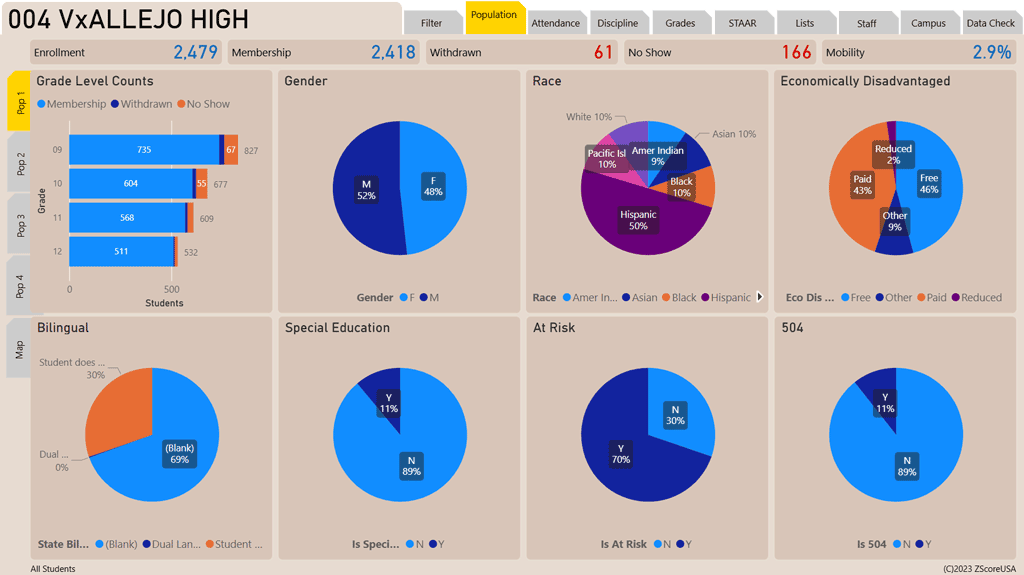
Power BI dashboard showing a sample page with 8 demographic visuals covering grade level, gender, special education, eco dis status, etc.

Demographics

Instantly see student demographics and program participation. With over 20 demographic visuals you will see multiple aspects of your student population including address maps for the first 3K students.
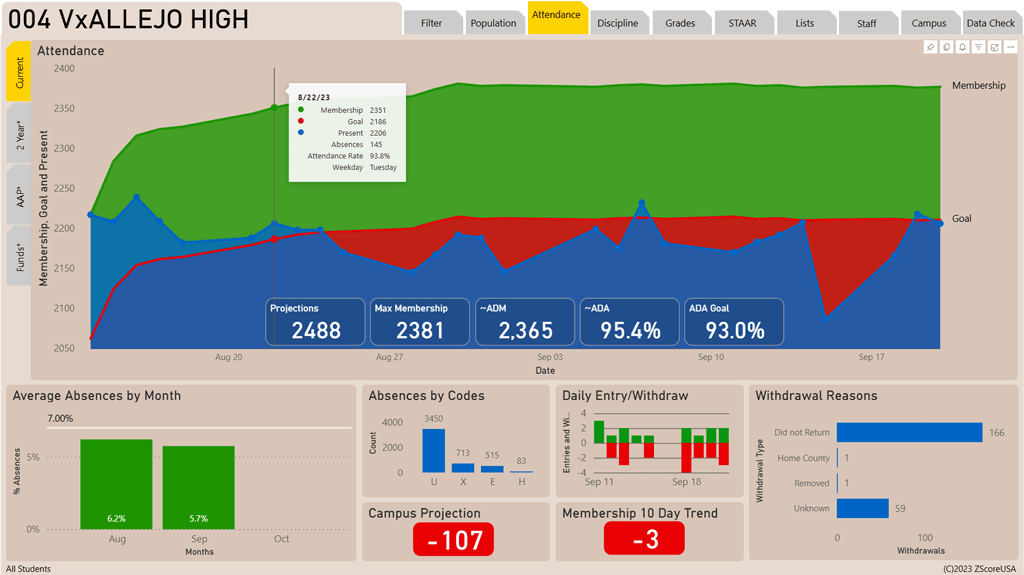
Power BI dashboard showing various attendance metrics covering ADM, ADA, trends and longitudinal performance.

Attendance

See daily attendance, membership and campus attendance goals. View 2 year comparisons as well as attendance accounting period attendance rates by teacher. Compare projected membership and attendance to goal with funding impact.
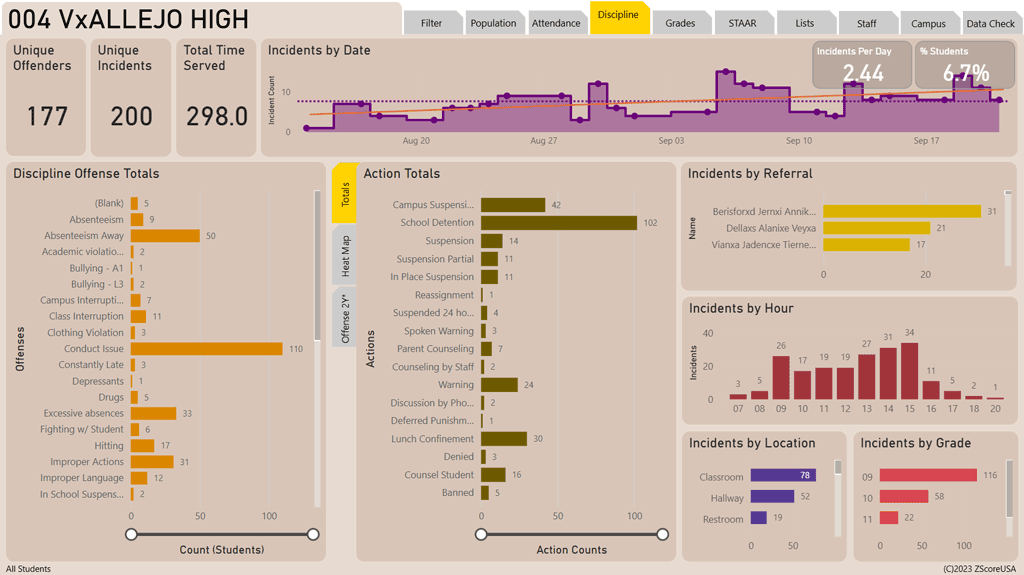
Power BI dashboard showing student discipline visuals covering offenses, actions, incidents and occurances by location, grade and time.

Discipline

View a variety of discipline metrics. See totals by offense, actions, time, grade and location. View historical incidents and trend analysis. Use the classroom heat map to identify classrooms in need of improved management.
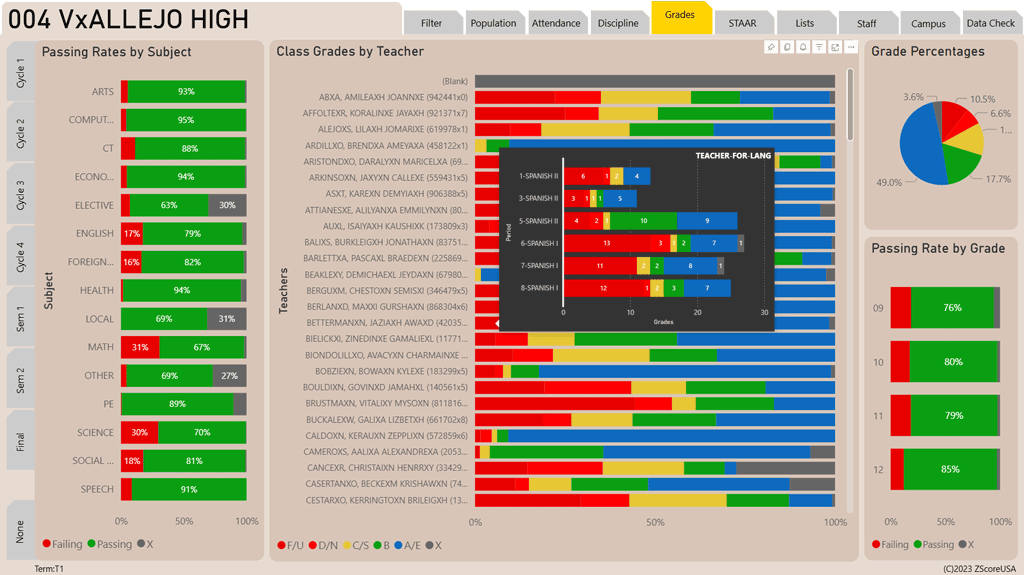
Power BI dashboard showing student grade performance by teacher, grade and subject.  A teacher class pop-up is also displayed.

Grading

See passing rates by subject & teacher. Drill down to class periods for current grades. See grades by cycle & semester.
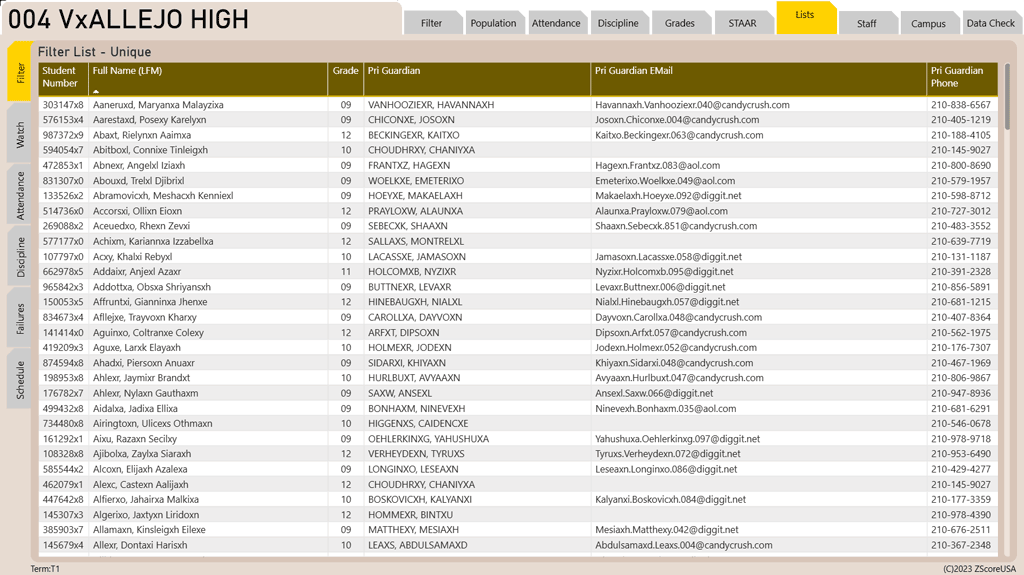
Power BI dashboard showing a list of detailed student contact information.  Multiple lists accessable from tabs for various scenarios.

Action Lists

Get action lists that are downloadable into Excel(R). Action lists identify students who need attention in areas such as attendance, failures, discipline etc.
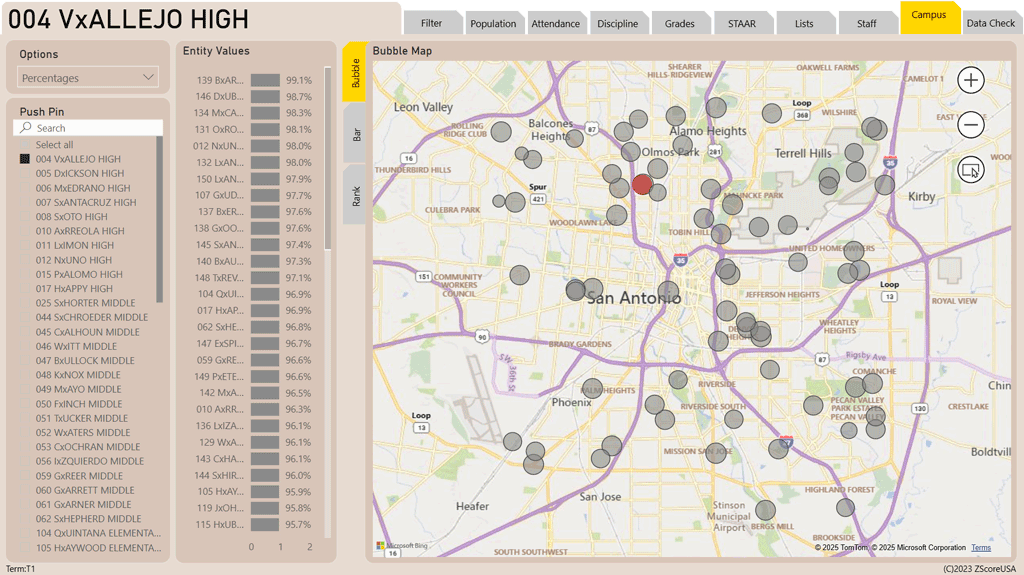
Power BI dashboard showing school comparisons mapped geographically with markers sized by proportion.

Campus Comparisons

Simplify planning by seeing your data from a mapped district view. Our bubble chart places a proportionally sized bubble, sized on your filter criteria, for each campus by address. See geographic relationships and instantly identify needs by geographic area or rank.
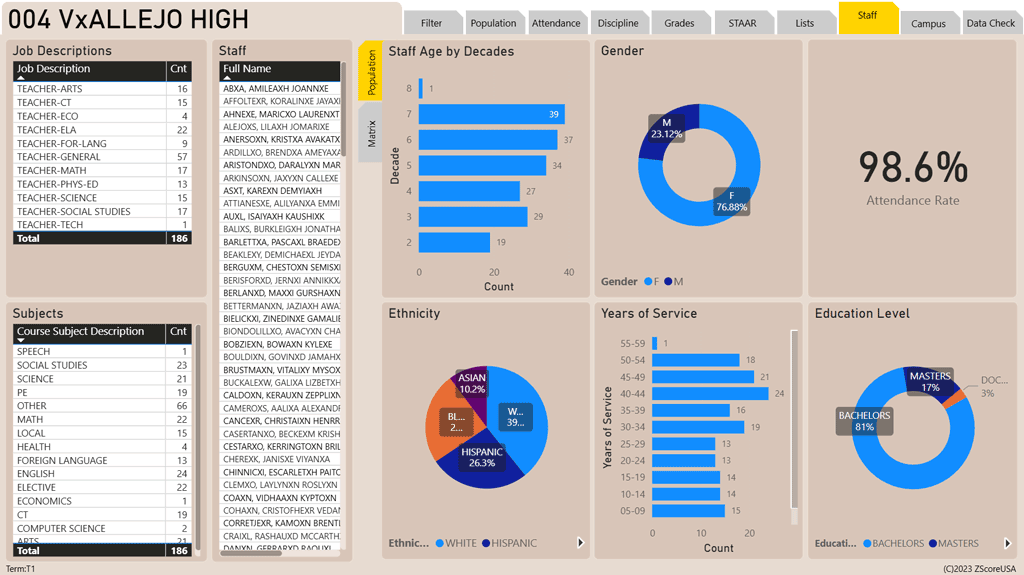
Power BI dashboard showing staff demographics with filters for subjects, job descriptions, etc.

Staff

View staffing information for all campus staff tied to a student. View basic demographics, schedules and student loads.

Your Journey Starts Here
Filters transform one dashboard into every dashboard you’ll ever need

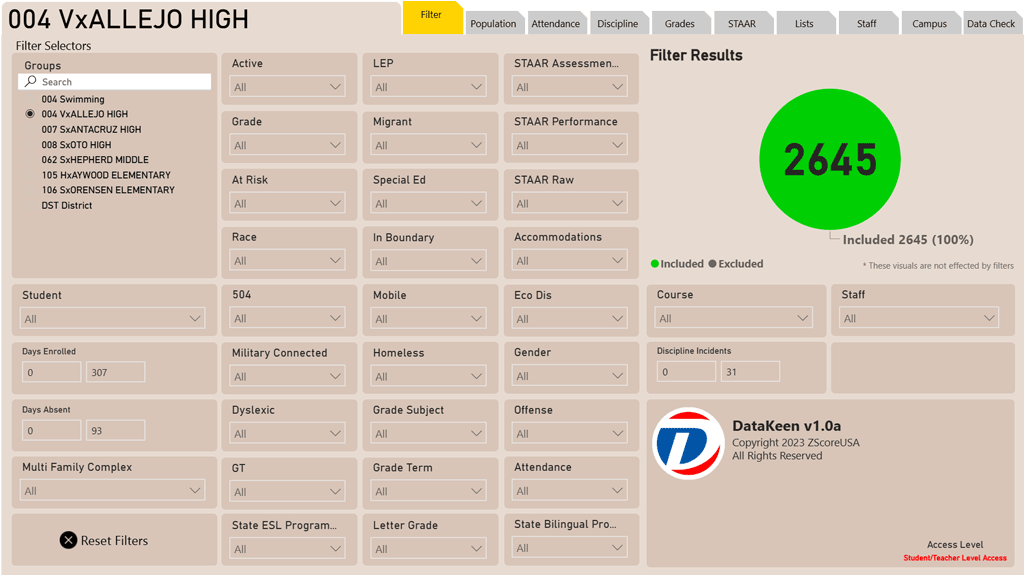
Power BI dashboard showing filters page with multiple filters covering student demographics, programs and performance.
One Dashboard, Endless Views
A single dashboard with multiple filters keeps all your data in one place, letting users slice, refine, and explore instantly—faster, clearer, and without the clutter of multiple dashboards.
One Dashboard, Smarter Decisions
For an educational administrator, a single dashboard with filters is far more effective than juggling multiple dashboards. It keeps all student, staff, and performance data in one unified view, while filters let you instantly drill down by grade level, department, or program. This saves time, reduces confusion, and ensures consistent insights for making informed decisions.
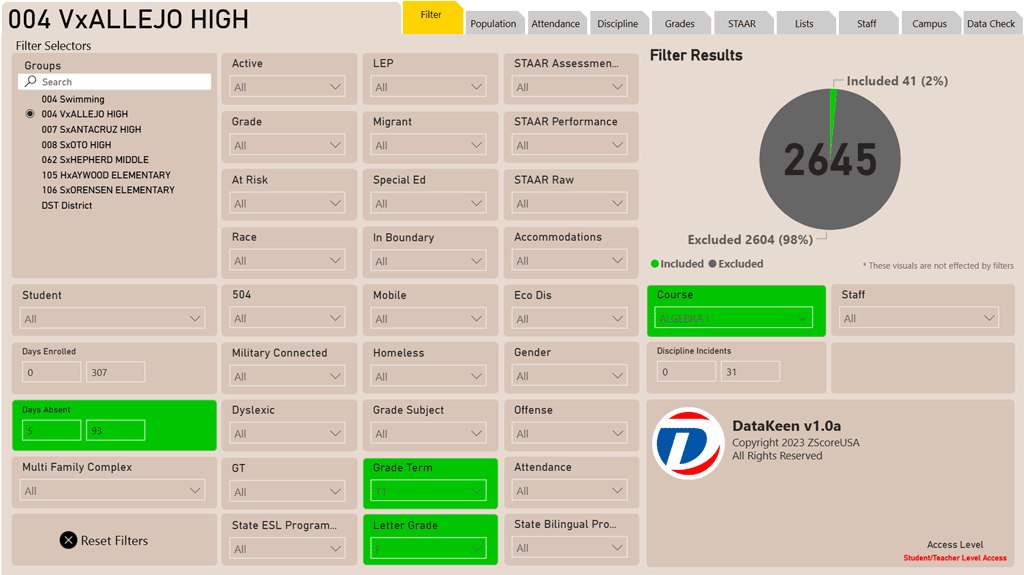
Power BI dashboard showing filters page with multiple filters covering student demographics, programs and performance with select filters chosen.
Targeted Instruction Scenario
You have determined that a targeted intevention is needed for students who are failing Algebra I and currently have more than a 5% absence rate.
Solution
With just 4 quick filters you will identify that there are 41 students needing this intervention. To identify Algebra I failures select Algebra I under Course. Next Select T1 for Grade Term and F for Letter Grade. Lastly we entered 5 for Days Absent.

You now can peer into this group and get the following information:

  • Student List - Get student IDs, Names, Parent/Guardians, Phone numbers, EMail addresses.
  • Demographics - Reveals who your audience really is—their age, background, and needs.
  • Attendance - Gets historical view of their attendance as well as current attendance rate.
  • Staff - Shows who is teaching these students as well as how they are distributed across staff.
Power BI dashboard showing discipline information arranged in various visuals covering offenses, actions, totals by grade, location and time.
New Administrator Scenario
A Principal or AP has been assigned to a new campus and needs to familiarize themselves with the campus students and staff.
Solution
The new Princpal or AP simply opens the DataKeen dashboard. DataKeen highlights enrollment numbers, attendance rates, and staff assignments in clean visual panels. This snapshot helps the administrator understand the scale and structure of the campus. Interactive charts display student achievement trends, discipline records, and program participation. By filtering, the administrator can drill down into grade levels or program, identifying strengths and areas needing attention.

Clear licensing. Fair pricing.
No surprises.

Licensing as easy as 1-2-3

Step 1: Microsoft Licensing

Educational institutions receive substantial discounts on Microsoft services, making it best for your district to acquire licensing directly. Microsoft offers discounted Microsoft 365 Education plans, with Power BI Pro included in the Microsoft 365 A5 license, or you may purchase Power BI Pro individually. Either way, schools benefit from reduced pricing on Power BI and other Azure services, ensuring maximum value for your investment.

Step 2: Dashboard Licensing Options

Our dashboard can be licensed in two flexible ways—either as a one‑time purchase or through a yearly subscription. This gives you the freedom to choose between a fully managed, turn‑key solution or a jumpstart package that empowers your own technical team.

Standard Yearly License

Looking for a turn‑key solution? Our standard yearly license is designed for you.

  • Annual fee includes updates to our ETL software and dashboard.
  • We install and manage all systems required to keep the dashboard running.
  • 100% cloud‑based on Microsoft Azure—no hardware to maintain.
  • Requires Microsoft licensing for Azure SQL, Azure Storage, and Azure Data Factory.

This option ensures your dashboard is always current, secure, and operational without burdening your staff.

Jumpstart Program

Have a capable technical team and want to build your own solution? The Jumpstart Program provides:

  • A one‑time purchase of our dashboard and ETL software.
  • Full control to customize and extend your own analytics journey.
  • Optional maintenance add‑on for ongoing support, if desired.

This option is perfect for districts that want to own their development path while still benefiting from our proven foundation.

Pricing

Data transformations and analytics can be costly—but we believe they shouldn’t be out of reach for public education. Our pricing is surprisingly affordable, because we are passionate about supporting schools and empowering educators with actionable insights. We love data, and we want our dashboard solution in your district.
Data leadership starts with you.
Contact ZScoreUSA to schedule a demo and see how DataKeen can transform your decision making.